

Drag to scroll
Drag any cell selection or fill handle outside the visible viewport to scroll the grid automatically while extending the selection.
Overview
The DragToScroll plugin watches for mouse drags that move outside the grid’s visible area. When the cursor crosses a viewport edge, the plugin scrolls the grid in that direction and extends the active selection to follow — exactly as spreadsheet applications behave.
The plugin is enabled by default. It activates during two types of drags:
- Cell selection drag — click a cell, hold, and drag beyond the edge to extend the selection.
- Fill handle drag — drag the fill handle (the small square in the bottom-right corner of a selection) beyond the edge to autofill into additional rows or columns.
Scroll speed follows a logarithmic curve: it starts slow when the cursor is just past the edge, then accelerates as the cursor moves farther away. This gives you precise control for small selections and fast navigation for large ones.
Enable drag to scroll
The plugin is enabled by default. To enable it explicitly, set dragToScroll to true:
dragToScroll: true,To see drag-to-scroll in action, click any cell in the grid below, hold the mouse button, and drag past any edge of the viewport.
import { HotTable } from '@handsontable/react-wrapper';import { registerAllModules } from 'handsontable/registry';
registerAllModules();
// Build column headers: 'Cost Center' + 49 monthly labels (Jan 2021 … Jan 2025)const months = ['Jan', 'Feb', 'Mar', 'Apr', 'May', 'Jun', 'Jul', 'Aug', 'Sep', 'Oct', 'Nov', 'Dec'];const colHeaders = ['Cost Center'];let year = 2021;let monthIndex = 0;
while (colHeaders.length < 50) { colHeaders.push(`${months[monthIndex]} ${year}`); monthIndex += 1;
if (monthIndex >= months.length) { monthIndex = 0; year += 1; }}
// Build 50 rows of budget dataconst data = [];
for (let row = 0; row < 50; row++) { const rowData = [`CC-${1000 + row}`];
for (let col = 0; col < 49; col++) { rowData.push(2000 + row * 100 + col * 50); }
data.push(rowData);}
const ExampleComponent = () => { return ( <HotTable data={data} colHeaders={colHeaders} width={500} height={220} rowHeaders={true} dragToScroll={true} licenseKey="non-commercial-and-evaluation" /> );};
export default ExampleComponent;import { HotTable } from '@handsontable/react-wrapper';import { registerAllModules } from 'handsontable/registry';
registerAllModules();
// Build column headers: 'Cost Center' + 49 monthly labels (Jan 2021 … Jan 2025)const months = ['Jan', 'Feb', 'Mar', 'Apr', 'May', 'Jun', 'Jul', 'Aug', 'Sep', 'Oct', 'Nov', 'Dec'];const colHeaders: string[] = ['Cost Center'];let year = 2021;let monthIndex = 0;
while (colHeaders.length < 50) { colHeaders.push(`${months[monthIndex]} ${year}`); monthIndex += 1;
if (monthIndex >= months.length) { monthIndex = 0; year += 1; }}
// Build 50 rows of budget dataconst data: (string | number)[][] = [];
for (let row = 0; row < 50; row++) { const rowData: (string | number)[] = [`CC-${1000 + row}`];
for (let col = 0; col < 49; col++) { rowData.push(2000 + row * 100 + col * 50); }
data.push(rowData);}
const ExampleComponent = () => { return ( <HotTable data={data} colHeaders={colHeaders} width={500} height={220} rowHeaders={true} dragToScroll={true} licenseKey="non-commercial-and-evaluation" /> );};
export default ExampleComponent;Configure scroll speed
Pass an object to dragToScroll to control how quickly the viewport scrolls:
dragToScroll: { interval: { min: 20, max: 500, }, rampDistance: 120,},The three parameters work together to shape the acceleration curve:
| Parameter | Type | Default | Description |
|---|---|---|---|
interval.min | number | 20 | Minimum scroll interval in milliseconds. This is the fastest the scroll gets — reached when the cursor is at rampDistance pixels outside the edge. A lower value produces faster peak scrolling. |
interval.max | number | 500 | Maximum scroll interval in milliseconds. This is the slowest the scroll starts — applied when the cursor first crosses the viewport edge. A higher value produces a more gradual start. |
rampDistance | number | 120 | Distance in pixels from the viewport edge over which the interval decreases from max to min. A shorter distance causes the scroll to reach peak speed more quickly. |
The interval decreases on a logarithmic scale as the cursor moves away from the viewport edge. This means the biggest speed increase happens close to the edge, and the rate of acceleration gradually falls off farther out.
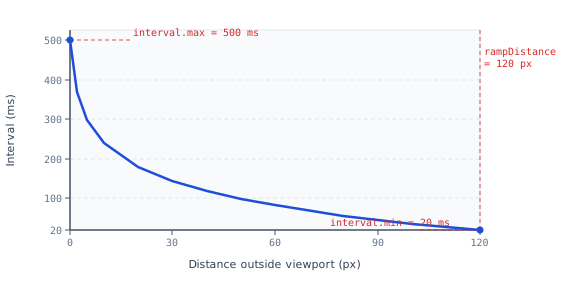
Use the sliders below to adjust all three parameters. The grid reloads with the new settings so you can drag a selection outside the viewport to feel the difference.
import { useState } from 'react';import { HotTable } from '@handsontable/react-wrapper';import { registerAllModules } from 'handsontable/registry';
registerAllModules();
// Build column headers: 'Cost Center' + 49 monthly labels (Jan 2021 … Jan 2025)const months = ['Jan', 'Feb', 'Mar', 'Apr', 'May', 'Jun', 'Jul', 'Aug', 'Sep', 'Oct', 'Nov', 'Dec'];const colHeaders = ['Cost Center'];let year = 2021;let monthIndex = 0;
while (colHeaders.length < 50) { colHeaders.push(`${months[monthIndex]} ${year}`); monthIndex += 1;
if (monthIndex >= months.length) { monthIndex = 0; year += 1; }}
// Build 50 rows of budget dataconst data = [];
for (let row = 0; row < 50; row++) { const rowData = [`CC-${1000 + row}`];
for (let col = 0; col < 49; col++) { rowData.push(2000 + row * 100 + col * 50); }
data.push(rowData);}
function Slider({ label, unit, min, max, step, value, onChange }) { return ( <label style={{ display: 'flex', flexDirection: 'column', gap: 4, font: '13px/1.4 sans-serif', color: '#334155' }}> <b style={{ fontFamily: 'monospace' }}>{label}: {value} {unit}</b> <input type="range" min={min} max={max} step={step} value={value} onChange={(event) => onChange(Number(event.target.value))} style={{ width: 200, cursor: 'pointer' }} /> </label> );}
const ExampleComponent = () => { const [intervalMin, setIntervalMin] = useState(20); const [intervalMax, setIntervalMax] = useState(500); const [rampDistance, setRampDistance] = useState(120);
return ( <div> <div style={{ display: 'flex', gap: 28, flexWrap: 'wrap', marginBottom: 16 }}> <Slider label="interval.min" unit="ms" min={10} max={200} step={10} value={intervalMin} onChange={setIntervalMin} /> <Slider label="interval.max" unit="ms" min={100} max={1000} step={50} value={intervalMax} onChange={setIntervalMax} /> <Slider label="rampDistance" unit="px" min={20} max={300} step={10} value={rampDistance} onChange={setRampDistance} /> </div> <HotTable data={data} colHeaders={colHeaders} width={500} height={220} rowHeaders={true} dragToScroll={{ interval: { min: intervalMin, max: intervalMax }, rampDistance }} licenseKey="non-commercial-and-evaluation" /> </div> );};
export default ExampleComponent;import { useState } from 'react';import { HotTable } from '@handsontable/react-wrapper';import { registerAllModules } from 'handsontable/registry';
registerAllModules();
// Build column headers: 'Cost Center' + 49 monthly labels (Jan 2021 … Jan 2025)const months = ['Jan', 'Feb', 'Mar', 'Apr', 'May', 'Jun', 'Jul', 'Aug', 'Sep', 'Oct', 'Nov', 'Dec'];const colHeaders: string[] = ['Cost Center'];let year = 2021;let monthIndex = 0;
while (colHeaders.length < 50) { colHeaders.push(`${months[monthIndex]} ${year}`); monthIndex += 1;
if (monthIndex >= months.length) { monthIndex = 0; year += 1; }}
// Build 50 rows of budget dataconst data: (string | number)[][] = [];
for (let row = 0; row < 50; row++) { const rowData: (string | number)[] = [`CC-${1000 + row}`];
for (let col = 0; col < 49; col++) { rowData.push(2000 + row * 100 + col * 50); }
data.push(rowData);}
function Slider({ label, unit, min, max, step, value, onChange }: { label: string; unit: string; min: number; max: number; step: number; value: number; onChange: (value: number) => void;}) { return ( <label style={{ display: 'flex', flexDirection: 'column', gap: 4, font: '13px/1.4 sans-serif', color: '#334155' }}> <b style={{ fontFamily: 'monospace' }}>{label}: {value} {unit}</b> <input type="range" min={min} max={max} step={step} value={value} onChange={(event) => onChange(Number(event.target.value))} style={{ width: 200, cursor: 'pointer' }} /> </label> );}
const ExampleComponent = () => { const [intervalMin, setIntervalMin] = useState(20); const [intervalMax, setIntervalMax] = useState(500); const [rampDistance, setRampDistance] = useState(120);
return ( <div> <div style={{ display: 'flex', gap: 28, flexWrap: 'wrap', marginBottom: 16 }}> <Slider label="interval.min" unit="ms" min={10} max={200} step={10} value={intervalMin} onChange={setIntervalMin} /> <Slider label="interval.max" unit="ms" min={100} max={1000} step={50} value={intervalMax} onChange={setIntervalMax} /> <Slider label="rampDistance" unit="px" min={20} max={300} step={10} value={rampDistance} onChange={setRampDistance} /> </div> <HotTable data={data} colHeaders={colHeaders} width={500} height={220} rowHeaders={true} dragToScroll={{ interval: { min: intervalMin, max: intervalMax }, rampDistance }} licenseKey="non-commercial-and-evaluation" /> </div> );};
export default ExampleComponent;Disable drag to scroll
Set dragToScroll to false to turn off the plugin entirely. The viewport will not scroll when the cursor leaves it during a drag.
dragToScroll: false,Related API reference
Configuration options
Plugins