

Batch operations
Batch CRUD operations, to avoid unnecessary rendering cycles and boost your grid’s performance.
Overview
Within Handsontable, every CRUD operation ends with a render(). In most cases, this is considered expected behaviour. The table has to reflect the requested changes at some point. However, sometimes you may find this mechanism slightly excessive.
For example, if you wrote a custom function that uses several CRUD operations, those CRUD operations will call a render() for each API method. You only need one render at the end, which is sufficient to reflect all the changes. You can treat those combined operations as a single action and let the render wait for them to complete. To do this, use suspend the render to batch the operations.
This can improve the overall performance of the application. Batching several operations can decrease the number of renders, so any API call that ends with a render will benefit from this improvement. It results in less layout trashing, fewer freezes, and a more responsive feel.
There are several API methods you can use for suspending, but batch() is the most universal method. It is a callback function where the render() is executed after all operations provided inside of the body are completed. It is best practice to use this method as it’s safer and easier to use. You just need to place all operations that you want to batch inside a closure. Handsontable takes care of the suspending and performs a single render() at the end.
The following snippet shows a simple example of a few operations batched. Three API operations are called one after another. Without placing them inside the batch callback, every single operation would end with a render(). Thanks to the batching feature, you can skip two renders and end the whole action with one render at the end. This is more optimal, and the gain increases with the number of operations placed inside the batch().
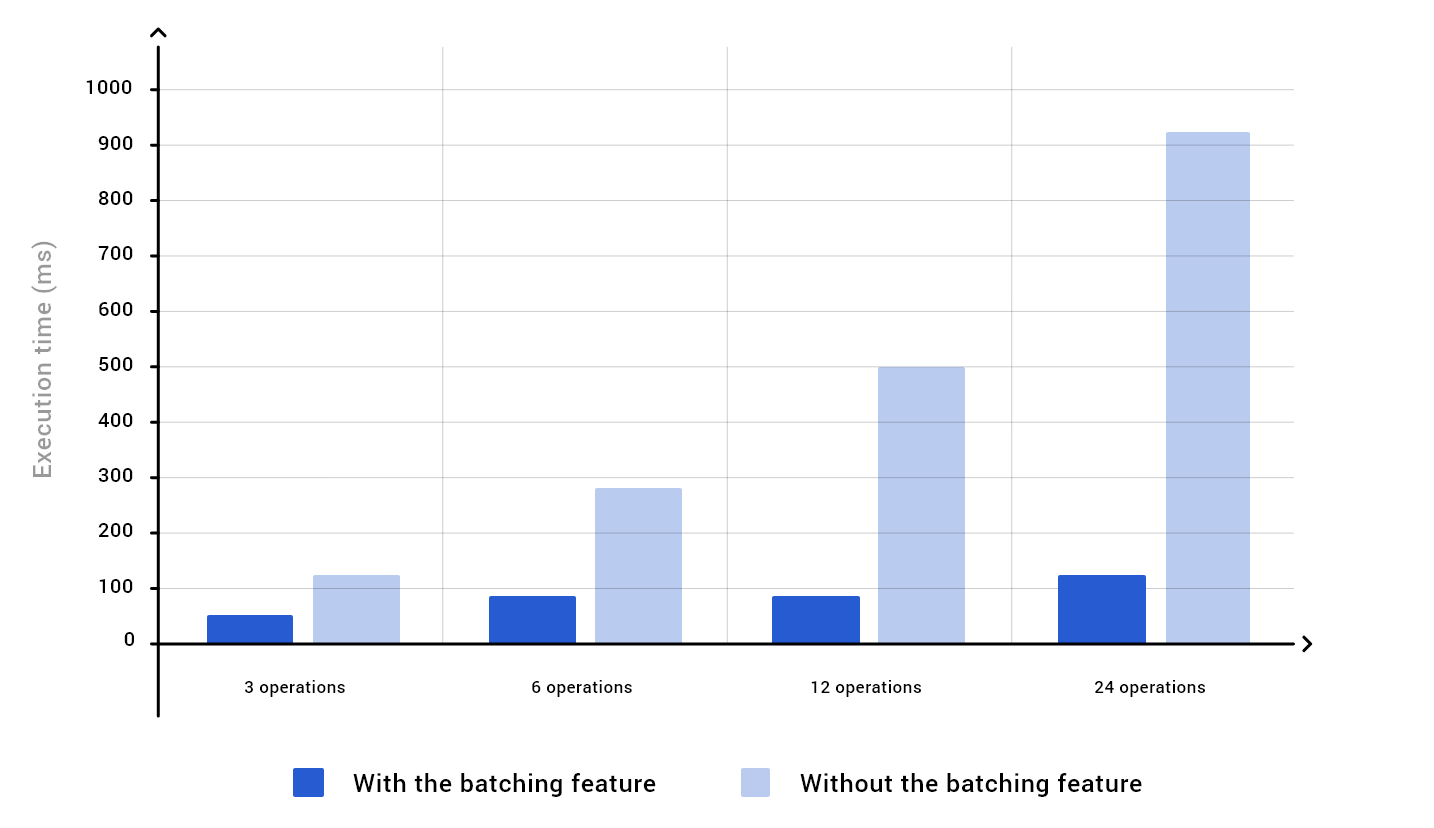
// call the batch method on an instancehot.batch(() => { // run the operations as needed hot.alter('insert_row_above', 5, 45); hot.setDataAtCell(1, 1, 'x'); hot.selectCell(0, 0); // the render is executed right after all of the operations are // completed});Suspending the render results in better performance, which is especially noticeable when numerous operations are batched. The diagram shows a comparison where the same operations were performed with (deep blue columns) and without the batch (light blue columns). The gain in speed of execution time increases with the number of operations batched.
API methods
The following API methods allow suspending:
batch()batchRender()batchExecution()suspendRender()andresumeRender()suspendExecution()andresumeExecution()
By using these methods, you can suspend:
- rendering
- execution
- both rendering and the execution.
The term “rendering” refers directly to DOM rendering, and the term “execution” refers to all operations that are different from DOM rendering. Currently, only the indexing recalculation allows you to postpone the process.
Method names that are prefixed with batch\*, i.e., batch(), batchRender(), and batchExecution() are recommended to be used as the first choice if you don’t need to batch async operations.
Methods names that are prefixed with suspend\*, i.e., suspendRender() and suspendExecution(), are the second choice. These are useful when you need to batch async operations. Essentially they work the same way as batch\* methods, but the render has to be resumed manually.
batch* methods
batch
This method supsends both rendering and other operations. It is universal and especially useful if you want to batch multiple API calls within the application.
hot.batch(() => { hot.alter('insert_row_above', 5, 45); hot.setDataAtCell(1, 1, 'x');
const filters = hot.getPlugin('filters');
filters.addCondition(2, 'contains', ['3']); filters.filter(); hot.getPlugin('columnSorting').sort({ column: 1, sortOrder: 'desc' }); // The table cache will be recalculated, and table render will be // called once after executing the callback});batchRender
The batchRender() method is a callback function. Excessive renders can be skipped by placing the API calls inside it. The table will be rendered after executing the callback. It is less prone to errors as you don’t have to remember to resume the render. The only drawback to this method is that it doesn’t support async operations.
hot.batchRender(() => { hot.alter('insert_row_above', 5, 45); hot.setDataAtCell(1, 1, 'x'); // The table will be rendered once after executing the callback});batchExecution
The batchExecution() method aggregates multi-line API calls into a callback and postpones the table execution process. After the execution of the operations, the internal table cache is recalculated once. As a result, it improves the performance of wrapped operations. Without batching, a similar case could trigger multiple table cache rebuilds. It is less prone to errors as you don’t have to remember to resume the operations. The only drawback to this method is that it doesn’t support async operations.
hot.batchExecution(() => { const filters = hot.getPlugin('filters');
filters.addCondition(2, 'contains', ['3']); filters.filter(); hot.getPlugin('columnSorting').sort({ column: 1, sortOrder: 'desc' }); // The table cache will be recalculated once after executing the // callback});suspend* and resume* methods
suspendRender() and resumeRender()
To suspend the rendering process, call the suspendRender() method just before the actions you want to batch. This is a manual approach.
After suspending, resume the process with the resumeRender() method. Every suspendRender() call needs to correspond with one resumeRender() call. For example, if you call suspendRender() 5 times, you need to call resumeRender() 5 times as well.
hot.suspendRender(); // suspend renderinghot.alter('insert_row_above', 5, 45);hot.setDataAtCell(1, 1, 'x');hot.resumeRender(); // remember to resume renderingsuspendExecution and resumeExecution
The suspendExecution() method suspends the execution process. It’s helpful to wrap the table logic changes such as index changes into one call after which the cache is updated. The method is intended to be used by advanced users. Suspending the execution process could cause visual glitches caused by not updating the internal table cache.
To suspend, call suspendExecution() just before the actions you want to batch. This is a manual approach. After suspending, you must remember to resume the process with the resumeExecution() method. In combination, these two methods allow aggregating the table logic changes after which the cache is updated. Resuming the state automatically invokes the table cache updating process.
hot.suspendExecution();const filters = hot.getPlugin('filters');
filters.addCondition(2, 'contains', ['3']);filters.filter();hot.getPlugin('columnSorting').sort({ column: 1, sortOrder: 'desc' });hot.resumeExecution(); // It updates the cache internallyLive demo of the suspend feature
The following examples show how much the batch() method can decrease the render time. Both of the examples share the same dataset and operations. The first one shows how much time lapsed when the batch() method was used. Run the second example to check how much time it takes to render without the batch() method.
/* file: app.component.ts */import { Component, ViewChild } from '@angular/core';import { GridSettings, HotTableComponent } from '@handsontable/angular-wrapper';
@Component({ selector: 'example1-batch-operation', standalone: false, template: ` <div class="example-controls-container"> <div class="controls"> <button id="buttonWithout" class="button button--primary" (click)="buttonWithoutClick()" > Run without batch method </button> <button id="buttonWith" class="button button--primary" (click)="buttonWithClick()" > Run with batch method </button> </div> <output class="console" id="output"> {{ output || 'Here you will see the log' }} </output> </div> <div> <hot-table [data]="dataInit" [settings]="gridSettings"></hot-table> </div>`,})export class Example1BatchOperationComponent { @ViewChild(HotTableComponent, { static: false }) readonly hotTable!: HotTableComponent;
dataInit = [ [1, 'Gary Nash', 'Speckled trousers', 'S', 1, 'yes'], [2, 'Gloria Brown', '100% Stainless sweater', 'M', 2, 'no'], [3, 'Ronald Carver', 'Sunny T-shirt', 'S', 1, 'no'], [4, 'Samuel Watkins', 'Floppy socks', 'S', 3, 'no'], [5, 'Stephanie Huddart', 'Bushy-bush cap', 'XXL', 1, 'no'], [6, 'Madeline McGillivray', 'Long skirt', 'L', 1, 'no'], [7, 'Jai Moor', 'Happy dress', 'XS', 1, 'no'], [8, 'Ben Lower', 'Speckled trousers', 'M', 1, 'no'], [9, 'Ali Tunbridge', 'Speckled trousers', 'M', 2, 'no'], [10, 'Archie Galvin', 'Regular shades', 'uni', 10, 'no'], ]; data2 = [[11, 'Gavin Elle', 'Floppy socks', 'XS', 3, 'yes']]; data3 = [ [12, 'Gary Erre', 'Happy dress', 'M', 1, 'no'], [13, 'Anna Moon', 'Unicorn shades', 'uni', 200, 'no'], [14, 'Elise Eli', 'Regular shades', 'uni', 1, 'no'], ];
readonly gridSettings: GridSettings = { height: 'auto', width: 'auto', colHeaders: [ 'ID', 'Customer name', 'Product name', 'Size', 'qty', 'Return', ], autoWrapRow: true, autoWrapCol: true };
output!: string; counter = 0;
buttonWithoutClick(): void { const t1 = performance.now();
this.alterTable();
const t2 = performance.now();
this.logOutput(`Time without batch ${(t2 - t1).toFixed(2)}ms`); }
buttonWithClick(): void { const hot = this.hotTable?.hotInstance; const t1 = performance.now();
hot?.batch(() => this.alterTable());
const t2 = performance.now();
this.logOutput(`Time with batch ${(t2 - t1).toFixed(2)}ms`); }
private alterTable(): void { const hot = this.hotTable?.hotInstance;
hot?.alter('insert_row_above', 10, 10); hot?.alter('insert_col_start', 6, 1); hot?.populateFromArray(10, 0, this.data2); hot?.populateFromArray(11, 0, this.data3); hot?.setCellMeta(2, 2, 'className', 'green-bg'); hot?.setCellMeta(4, 2, 'className', 'green-bg'); hot?.setCellMeta(5, 2, 'className', 'green-bg'); hot?.setCellMeta(6, 2, 'className', 'green-bg'); hot?.setCellMeta(8, 2, 'className', 'green-bg'); hot?.setCellMeta(9, 2, 'className', 'green-bg'); hot?.setCellMeta(10, 2, 'className', 'green-bg'); hot?.alter('remove_col', 6, 1); hot?.alter('remove_row', 10, 10); hot?.setCellMeta(0, 5, 'className', 'red-bg'); hot?.setCellMeta(10, 5, 'className', 'red-bg'); hot?.render(); // Render is needed here to populate the new "className"s }
private logOutput(output: string): void { this.output = `[${this.counter}] ${output}\n${this.output ?? ''}`; this.counter = this.counter + 1; }}/* end-file */
/* file: app.module.ts */import { NgModule, ApplicationConfig } from '@angular/core';import { BrowserModule } from '@angular/platform-browser';import { registerAllModules } from 'handsontable/registry';import { HOT_GLOBAL_CONFIG, HotGlobalConfig, HotTableModule } from '@handsontable/angular-wrapper';import { CommonModule } from '@angular/common';import { NON_COMMERCIAL_LICENSE } from '@handsontable/angular-wrapper';/* start:skip-in-compilation */import { Example1BatchOperationComponent } from './app.component';/* end:skip-in-compilation */
// register Handsontable's modulesregisterAllModules();
export const appConfig: ApplicationConfig = { providers: [ { provide: HOT_GLOBAL_CONFIG, useValue: { license: NON_COMMERCIAL_LICENSE, } as HotGlobalConfig } ],};
@NgModule({ imports: [ BrowserModule, HotTableModule, CommonModule ], declarations: [ Example1BatchOperationComponent ], providers: [...appConfig.providers], bootstrap: [ Example1BatchOperationComponent ]})
export class AppModule { }/* end-file */<div> <example1-batch-operation></example1-batch-operation></div>Related articles
Related guides
Related blog articles
Configuration options
Core methods
Hooks